
A Complete Guide for LED Display Pixel Pitch

Pixel pitch is the distance, measured in millimeters, between the centers of two adjacent LED lights on a display. It is commonly represented by the letter “P” followed by a number. For example, a P3 LED display has a 3mm gap between each LED.
Contents
Pixel pitch is the distance, measured in millimeters, between the centers of two adjacent LED lights on a display. It is commonly represented by the letter "P" followed by a number. For example, a P4 LED display has a 4mm gap between each LED.
Pixel pitch directly affects image clarity. A mismatched pixel pitch for your viewing distance can result in a grainy or pixelated image, reducing the overall viewing experience.
Use these simple formulas to find the right pixel pitch for your setup:
Type Formula Example:
P3 LED Display
Minimum Viewing Distance Pixel Pitch × 3 = Distance (ft)3mm × 3 = 9 ft
Optimal Viewing DistancePixel Pitch × 10 = Distance (ft)3mm × 10 = 30 ft
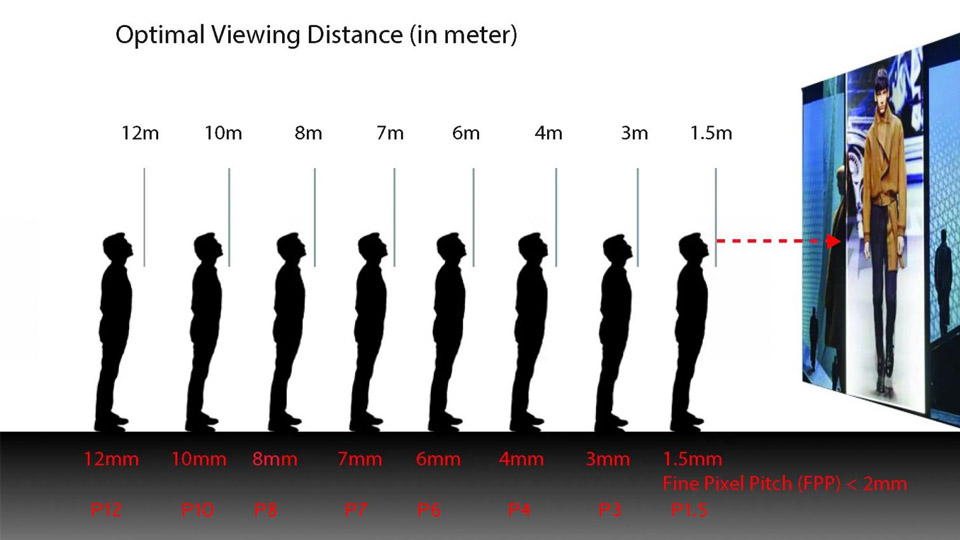
LED display viewing distance
Location: Indoor displays are viewed up close, so they use smaller pitches (1 to 5mm). Outdoor displays are viewed from farther away and use larger pitches (3 to 10mm or more).
Resolution: Smaller pixel pitch means higher resolution. A 4K display requires fewer modules with a smaller pitch.
Budget: Smaller pitches cost more due to additional components. Slightly increasing the pitch can reduce costs while maintaining acceptable quality.
Screen Size: Larger screens can afford a slightly wider pitch without noticeably impacting visual quality.
Lower pixel pitch = sharper image, higher cost, better for close viewing
Higher pixel pitch = less detail, lower cost, better for distant viewing
Always match pixel pitch to your intended viewing distance for the best results